Salesforce Workflow Triggers for Outbound Signal Automation
Migrate your Workflow Rules to Flow Builder before the vendor stops supporting them.

Salesforce Workflow Rules stopped being supported on December 31, 2025. Flow Builder is now the only path forward for automating outbound signals in Salesforce, and if your team hasn't rebuilt on it yet, this piece walks through exactly how to do it right. That means understanding the migration mechanics as well as the design discipline that separates teams catching real intent signals from teams quietly running broken automation that nobody noticed was broken.
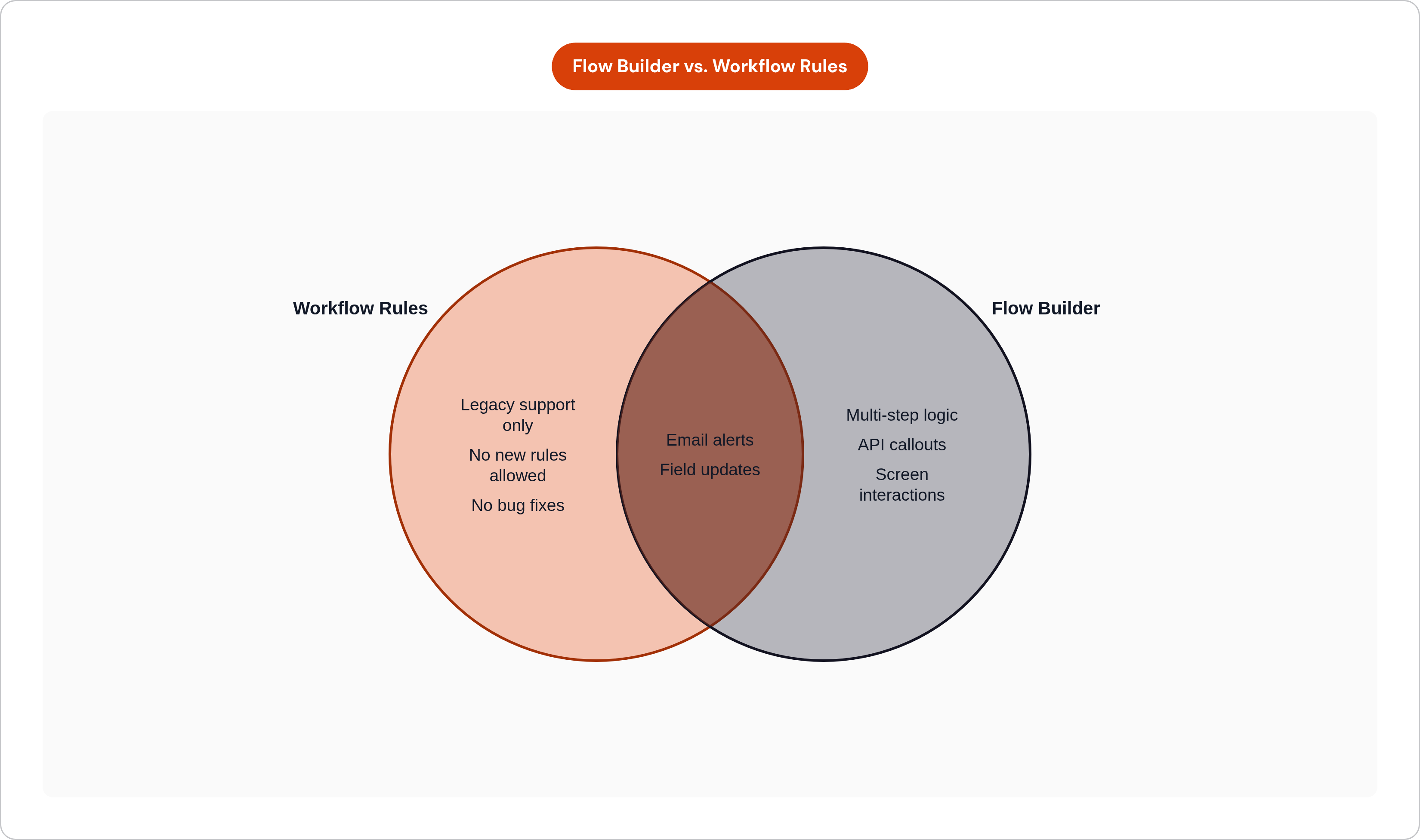
Here's the part that should worry you more than the sunset date itself: Salesforce didn't flip a switch. Existing Workflow Rules still fire. Your MQL-to-SQL alert still sends. Your task-creation rule still creates tasks. Nothing looks different in the org, which is exactly the problem, because "still running" and "still supported" are not the same claim. No new rules can be built. No bugs get fixed. If a rule misfires on a pricing page visit or breaks silently on a job-change trigger, there's no vendor backstop coming to catch it. Workflow Rules supported four actions: email alerts, field updates, tasks, and outbound messages. Every one of those now has to live in Flow Builder, and every quiet dependency your team built on the old tool is now a liability you own outright. If your outbound signal automation still runs on Workflow Rules, you're borrowing time you don't actually have.
What Flow Builder actually replaces — and what it adds
Salesforce shipped Flow Builder as the deliberate, primary declarative automation layer for the platform going forward, and it does everything Workflow Rules did while adding capability that simply didn't exist before: multi-step logic, screen interactions, API callouts baked into the flow itself, and native support for invocable actions.
The piece that matters most for outbound signal work is the outbound message action inside record-triggered flows. A flow fires after a record is saved, and it can send a SOAP message to an external endpoint in real time. Picture a high-priority lead record getting created in Salesforce: the flow fires immediately, the SOAP message reaches your outreach system, and the rep or sequence tool has the signal before the lead has cooled. That's not a small technical detail. It means signal detection and downstream action can now sit in one flow instead of being stitched together across three disconnected tools with their own failure points.
Research from Oliv.ai frames this as three layers worth separating in your head. Data collection is commoditized at this point; logging a field to a record isn't a differentiator, it's the floor. Intelligence is where CRM context turns raw data into an actual read on a deal, something a rep or a system can act on with confidence. Agent execution is where the system acts on that context without a human pushing the button. Flow Builder lives at the intelligence layer, and it's increasingly the on-ramp to the agent layer. That distinction matters because teams that treat this as a lift-and-shift migration, just rebuilding old rules in a new tool, are going to miss what Flow Builder actually makes possible.
How record-triggered flows detect outbound signals
Record-triggered flows watch an object for change and fire when conditions you define are met. That's the mechanism, full stop. But the value is entirely in which changes you decide are worth watching.
Lead status moving from MQL to SQL is an obvious one. Account field updates matter too: employee count crossing a threshold, an industry code changing, anything that shifts a record from "doesn't fit" to "fits now." Opportunity stage changes can flag re-engagement windows on deals that went quiet. New contact records matching your ICP, or ideal customer profile, criteria are worth a flow of their own. And then there are the custom fields, pricing page visits, form fills, product usage events, piped in via API from wherever those signals actually live, which is often outside Salesforce entirely until you build the pipe.
Timing is its own decision. Flows can run immediately after save, which is the fast path for anything time-sensitive, or they can run on a schedule for nurture sequences and slower follow-up cadences. Entry conditions are what keep this from turning into noise: only records meeting your defined criteria enter the flow at all, so a poorly scoped entry condition is the difference between a precise trigger and a flood of false positives. Branching logic lets one flow handle multiple plays. A job-change signal on a cold account should route somewhere different than a pricing page visit on an opportunity that's already in motion, and a single well-built flow can send both down the right path without needing two separate builds.
Here's the discipline that gets skipped constantly: map the entry conditions and branching to actual sales plays before you touch Flow Builder's interface. The automation should follow the playbook. Too many teams build the flow first and try to retrofit a play onto it afterward, and that's backwards.
Connecting flow-triggered signals to external outreach systems
The outbound message action is the native handoff. When a flow fires, it sends a SOAP message to a designated external endpoint, and that's your bridge out of Salesforce into whatever system actually executes the outreach.
In practice, teams wire this up a few different ways. Zapier's New Outbound Message trigger generates a webhook URL that Zaps can pick up, routing the signal into email tools, Slack channels, or sequencing platforms. Workato takes a similar approach: it monitors records for change through the flow, receives outbound messages as trigger events, and processes them into downstream recipes, which works well for teams that need more complex routing logic than a simple webhook handoff. For teams connecting directly to a sequencing platform or homegrown outreach infrastructure, Flow Builder also supports HTTP callouts, cutting out the middleman tool entirely.
The pattern is the same regardless of which route you pick: CRM event triggers the flow, the flow sends an outbound message, an external system receives it, and personalized outreach fires from there. What differs is how many hops that signal takes and how many places it can break along the way. For high-growth teams that don't want to wire Zapier to Workato to a sequencing tool and then debug which link in that chain dropped the signal, some platforms receive the signal and execute the outreach in one motion, cutting the integration surface down to something you can actually reason about.
Speed is the whole point here, and it's worth being blunt about it. A pricing page visit acted on within four minutes and the same visit acted on 48 hours later are not the same signal anymore, and lead response time is the metric that captures exactly how much that gap costs. The intent has usually cooled, the prospect has often moved on to a competitor's demo, and the context that made the moment valuable in the first place has evaporated. Fast matters enormously in signal automation, and arguably more than any other single factor in whether the automation pays off.
The two failure modes that break signal automation silently
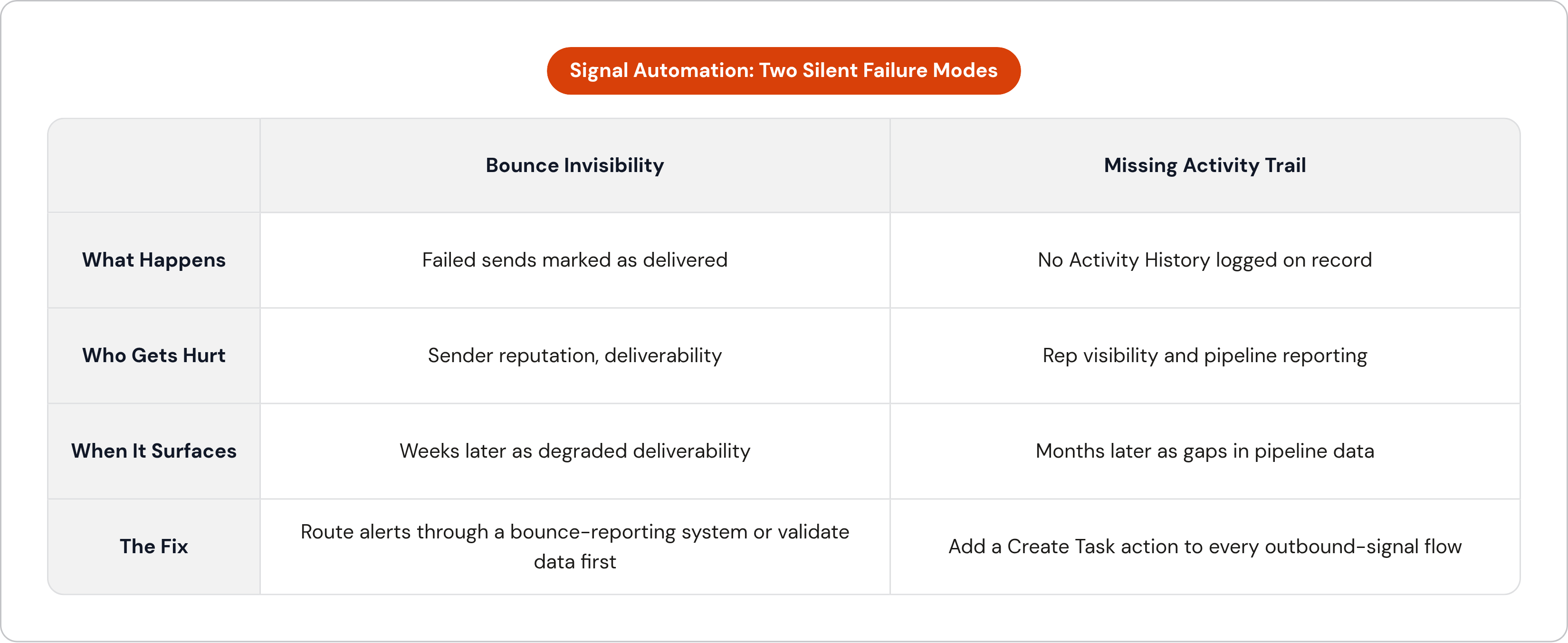
MassMail's workflow migration guide documents two gaps in Flow Builder that quietly undermine everything above, and both share a nasty trait: they don't announce themselves.
The first is bounce invisibility. When a flow-triggered email alert hits an invalid address or a full mailbox, Salesforce marks the send as delivered anyway. The record shows no failure. From inside the CRM, the signal looks acted on, the rep moves on, and nobody knows the message never landed. Do this repeatedly against a list with bad data, and you're not just missing follow-ups, you're accumulating bounces that quietly damage your sender reputation and overall email deliverability over weeks and months. The fix is to route alert delivery through a system that reports real bounce data, or better, validate contact data as part of a broader data hygiene practice before the flow ever fires.
The second is the missing activity trail. Flow-triggered alerts don't automatically log to Activity History on the related Lead, Contact, or Case. Unless you've explicitly added a Task-creation action to the flow, there's no record anywhere that the signal fired or that anything was sent. That breaks rep visibility, and it breaks reporting right along with it, because you can't measure what you can't see. The fix here is straightforward, if easy to skip: add a Create Task action to every outbound-signal flow, logging the signal type, the timestamp, and the recipient, which closes the activity logging gap entirely.
Notice what these two failures have in common. Neither shows up in the moment. Both surface weeks or months later, one as degraded deliverability you can't immediately trace back to a cause, the other as a gap in pipeline data that makes it impossible to tell which signals actually worked. A silent failure is harder to catch than an obvious bug precisely because nobody goes looking for it; it just erodes your numbers until someone finally notices.
Where Agentforce fits into signal-triggered outbound in 2026
Agentforce is Salesforce's autonomous agent layer, and the architectural detail worth understanding is that these agents operate inside the org using the same object model and the same APIs a human user sees. That's not a minor implementation note. It means an Agentforce agent doesn't need a custom API connection to read a Lead record or update an Opportunity stage; it already lives inside the system that owns that data.
The Spring 2026 release pushed this further with always-on prospecting. Agentforce enriches Salesforce data with external signals, builds prioritized prospect lists against seller-defined criteria, and surfaces those lists directly in CRM and in Slack. There's a native SDR agent in that release too, engaging prospects around the clock, answering questions, handling objections, scheduling meetings, all using CRM and external data as its working context.
Vantagepoint.io breaks Agentforce's action types into three tiers worth knowing. Declarative and low-code covers Flows and Prompt Templates, the layer anyone who's already built in Flow Builder will recognize immediately. Pro-code and integration covers Apex and External Services, for custom logic and connections that go beyond what declarative tools can express. Enterprise integration covers MuleSoft, for connecting legacy systems at scale. Pricing runs per conversation at $2 rather than per seat, which matters more than it might sound: cost scales with actual agent activity, not headcount, which is a meaningfully different cash conversation for a high-growth team watching burn against pipeline.
IDC's 2025 forecast projected a 25 to 30 percent reduction in sales cycle duration by 2026 for enterprises running AI-augmented CRM workflows. Agentforce, given how deeply it sits inside the Salesforce object model, is the most direct native path to that outcome for teams already built on the platform. Whether most teams are actually positioned to capture that, though, is a separate question, and it's the one the next section has to deal with honestly.
What "agentic" actually means — and where most teams aren't there yet
There's a real distinction between a sensing tool and an acting agent, and it's worth being precise about it because a lot of vendor language blurs it on purpose. A sensing tool watches a record, scores it, flags it, and stops there. An acting agent sends the follow-up, logs the activity, and moves the opportunity forward without a human in between. Sensing without execution adds noise rather than signal to your pipeline, another flag in a queue somebody has to triage manually, and most tools marketed today as "AI sales agents" sit closer to the sensing end of that spectrum than the marketing suggests.
Gartner has a name for this gap: agent washing, the practice of rebranding task-specific AI features, auto-drafted emails, lead scoring, CRM logging, as agentic when a human is still driving every meaningful decision. Worth sitting with that term for a second, because it cuts against the instinct to assume "AI-powered" and "autonomous" mean the same thing. They don't, and the difference shows up fast once you try to hand a genuinely open-ended decision to a system that was only ever built to flag.
Autonomy that actually works is also a constraint-design question. Gartner's 2025 research found that agents given explicit negative instructions, meaning explicit statements of what not to do, reduced off-script behavior by 58% compared to agents given only positive instructions. That's a meaningful number, and it tells you something important: giving an agent more freedom isn't the lever that makes it trustworthy. Telling it clearly where the boundaries sit matters far more. Practitioners writing for Apex Hours have made a similar point from the implementation side: Agentforce isn't plug-and-play, and clean data, clear processes, and careful prompt design are prerequisites, not nice-to-haves. A messy org produces messy agent behavior, predictably.
So where does that leave most teams heading into 2026? Realistically: Flow Builder handles signal detection and routing, and agent execution handles discrete, well-scoped plays, not open-ended autonomy across the whole outbound motion. The teams getting real value out of this define the play with precision first, and only then decide which parts of it are safe to automate, rather than deploying an agent and hoping it figures out the right play on its own.
Designing outbound signal flows that actually compound
A signal flow you build once and never touch again is a flow that's already decaying. Every trigger condition, every branch, every downstream action is a hypothesis about what makes a given moment worth acting on, and hypotheses need testing, not just deployment.
The loop looks like this. Define the signal and the specific play it should trigger, tight enough that your entry conditions map exactly to real ICP behavior rather than a rough approximation of it. Log everything: use the Task-creation fix from earlier to build an activity record for every signal that fires and every action taken in response. Measure response and conversion rate broken out by signal type, because "outbound signals" as a category tells you nothing; you need to know which specific trigger produced a meeting and which one just produced noise. Then cut what's underperforming, sharpen the entry conditions on what's working, and add new signals as they show up in your data.
Salesforce's 2026 State of Sales report found that 83% of sales teams using AI reported revenue growth, compared to 66% of teams that don't, a 17-point gap. That gap tracks less with who adopted a tool and more with who built an iteration discipline around the tool versus who deployed it once and walked away.
A few mistakes show up often enough to name directly. Too many signals firing with no prioritization means every trigger reads as urgent, which in practice means nothing does, and reps learn to ignore the queue. Generic outreach attached to a precise signal wastes the precision entirely; the trigger did its job identifying the moment, and then the message failed to meet it. And skipping the human in the loop for genuinely high-value signals, an executive job change, a competitor displacement, is its own mistake in the other direction: some moments call for a rep's judgment, not an automated sequence running on autopilot.
For high-growth teams running outbound without a large sales org behind them, the coordination cost of managing this across Salesforce, a separate outreach tool, and a separate reporting layer adds up fast, and it's exactly the kind of overhead that breaks the iteration loop before it ever gets tight. Consolidating signal intake, sequence execution, and CRM logging into one place keeps that loop close enough together to actually run instead of scattering it across seven tools that each need their own maintenance.
The end state worth building toward is fewer, sharper signals, acted on faster, with every action logged so the next cycle starts smarter than the last one did. That's not a finished system. It's a discipline, and it only compounds if someone keeps running the loop.