LinkedIn Outbound Automation Limits and Safe Usage in 2026
LinkedIn's trust score matters more than any weekly cap when keeping automation safe.

LinkedIn's outbound limits in 2026 don't work like a fixed rulebook you memorize once and forget. The platform runs a behavioral scoring system that watches how an account acts, minute by minute, and assigns it a trust level that moves up or down based on what it sees. That matters more than any single number, because plenty of teams still treat staying under some weekly cap as the whole game. It isn't, and treating it that way is the most expensive mistake in this whole conversation. The rest of this piece is about how the classifier actually thinks, not about a headline figure.
Before getting into mechanics, it helps to name what the classifier actually watches for. It checks session origin (a data-center IP versus a home IP), timing regularity (the same send times every day read as scripted), ignored-invitation ratio (low acceptance signals spam independent of volume), script injection (browser extensions that touch LinkedIn's page code get caught at the fingerprint level), IP-and-location mismatch (logging in from one city while automation fires from another is a hard flag), Social Selling Index (SSI) trajectory, and repeated message text sent to hundreds of different people. Staying under the weekly numeric limit does not make an account safe. Behavioral signals trip restrictions at any volume, and most outreach programs still don't budget for that at all.
The hard weekly cap and what account tier actually changes
The number practitioners have settled on, across thousands of accounts and years of trial and error, sits at 100 invitations per rolling 7-day window. LinkedIn has never published this figure, but the consensus across the automation and sales-ops community holds steady enough to treat as fact. It applies whether the account runs Free, Premium, or Sales Navigator, which surprises people who assume paying more buys more room to send. It doesn't, and that assumption is where a lot of budget gets wasted on the wrong upgrade.
A few mechanics trip teams up constantly. The window rolls day by day as a rolling 7-day window instead of resetting on a calendar week, so a team planning around a Monday reset gets blocked mid-week with no idea why. Withdrawing a pending invitation doesn't hand the quota back either, since the limit counts requests sent, not requests still waiting. There's a separate ceiling on pending invitations sitting around 1,000: hit that number and nothing new goes out until old requests get withdrawn. Staying well under it, closer to 500 pending at any time, buys real room to breathe.
So what does Sales Navigator actually buy, if not a bigger invitation allowance? Better targeting filters, saved searches, lead and account lists, job-change and funding alerts, and 50 InMail credits a month. None of that touches the weekly cap directly. But here's the indirect effect worth sitting with: better filters mean better-fit prospects, which means higher acceptance rates, and acceptance rate is what actually moves the ceiling. One edge case worth flagging: Free accounts that attach a note to a connection request appear capped around 5 requests a week, well below the standard number. The real variable running underneath all of this isn't subscription tier. It's trust, and no paid feature buys that directly, no matter what the sales page implies.
How account health modifies the effective limit
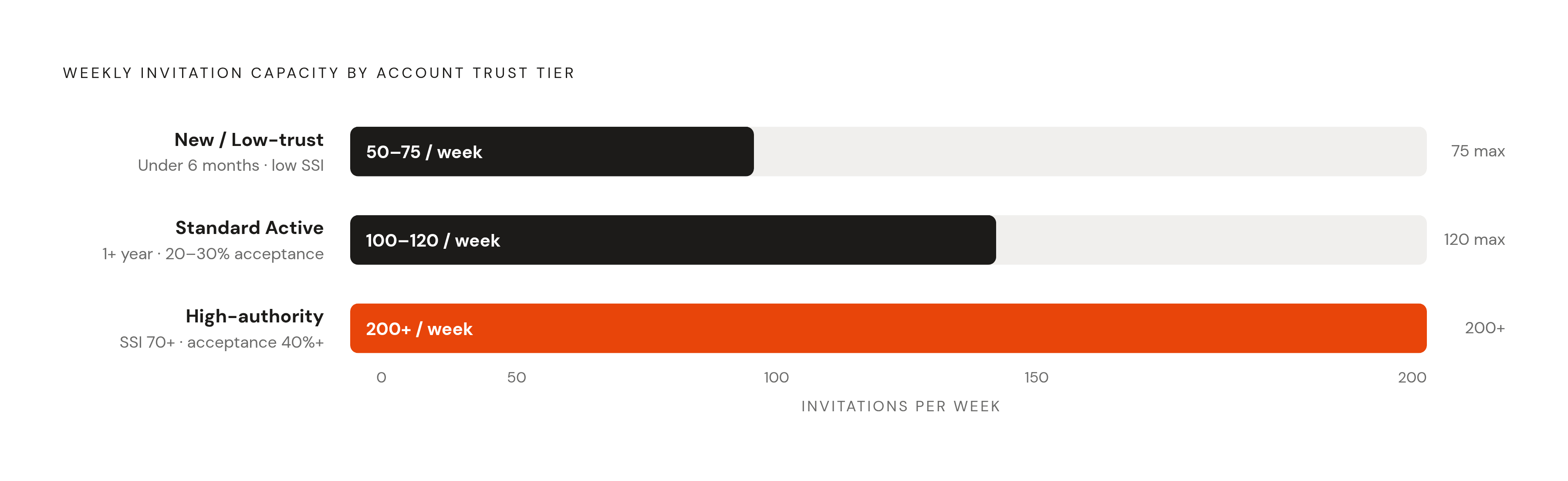
Three rough tiers show up consistently in how accounts get treated. New or low-trust accounts, meaning ones under six months old with incomplete profiles, low SSI scores, or a history of ignored requests, sit around 50 to 75 requests a week, roughly 10 to 15 a day. Push past that on a fresh account without a proper warm-up period and a temporary restriction tends to follow fast, sometimes within days.
Standard active profiles, active a year or more, posting consistently, holding a 20 to 30% acceptance rate, land around 100 to 120 a week, or 20 to 25 daily. That's the baseline most working professionals sit at without thinking about it. High-authority accounts, meaning a Social Selling Index above 70, steady high-engagement content, and acceptance rates above 40%, can reach 200 or more a week, closer to 30 to 40 a day, and tend to absorb an occasional spike in activity without tripping anything.
Acceptance rate is the loudest signal in the system, louder than volume, louder than tier, louder than tenure. Drop below roughly 30% and the classifier starts reading the account as spam, triggering LinkedIn's internal spam filter, no matter how far under the numeric cap it sits, tightening the effective ceiling in response. Push volume against a weak acceptance rate and restriction usually follows within weeks, not months. On the other end, accounts with SSI scores of 70 or higher approach that 200-a-week ceiling with some safety margin, and Sales Navigator users on mature, well-aged accounts commonly run 150 to 200 a week without incident.
Messages sit on a separate meter entirely. Direct messages to first-degree connections stay safe around 30 to 60 a day, and the total daily action budget across everything, connections, messages, profile views, combined, runs somewhere between 80 and 200 actions. Here's a number worth sitting with: one seat touching 400 to 500 new people a month at a one-in-three acceptance rate produces roughly 150 new conversations a rep per month, before a single follow-up message goes out. Volume isn't the lever most teams think it is. Acceptance rate does the real work, and chasing volume while ignoring it gets the whole equation backwards.
What enforcement actually looks like when you cross the line
Enforcement isn't a switch. It's a ladder. The first rung is a feature-restricted state, sometimes called a rate limit, usually lasting one to three weeks depending on the account's history and how badly it tripped the classifier: outreach capability goes dark, but the account itself survives. The next rung is a full restriction that locks outreach capability entirely until LinkedIn's review process clears the account. Beyond that, for severe or repeat cases, permanent removal is on the table, and that's exactly what showed up at the vendor level in early 2026.
Roughly 1 in 50 outreach-heavy accounts hits a full restriction in a given year, by practitioner estimate. That's not a rounding error. Across a sales team of a dozen reps running real outbound volume, that number stops being abstract fast. Platforms like Cardinal, which run outbound through AI agents rather than browser-injected tools, sit at a different point on that risk curve by design.
March 2026 gave the industry its clearest look yet at how far enforcement reaches. LinkedIn took down HeyReach's company page and banned the LinkedIn profiles of the company's founders directly, while the roughly 30,000 individual users running sequences through the tool kept operating without interruption to their own accounts. Only HeyReach's own LinkedIn presence took the hit. That's a genuinely new enforcement category: going after the vendor's infrastructure and public identity instead of throttling users one at a time. One industry analysis floated a figure that roughly 40% of accounts on flagged automation tools picked up restrictions in the first quarter of 2026. Treat that number as directional rather than exact, since it traces to a single analysis, but the direction itself isn't in question: the crackdown reached wide, not narrow.
What actually drags an account toward the worst outcomes? Running sessions through shared-IP cloud tools where the origin is a data center rather than a home network. Browser extensions injecting code into LinkedIn's pages. Sending at the same clock time every single day. Pushing volume near the weekly cap while acceptance rates sag. Skipping the warm-up period entirely on an account that's new or coming back from dormancy. Any one of these raises risk on its own, but stack two or three together and restriction stops being a possibility and starts being a likelihood.
Once an account gets restricted, it doesn't pick up where it left off after the lock lifts. It effectively restarts at new-account trust levels, and the ceiling has to rebuild slowly from there. The safest posture treats a recovering account exactly like a brand-new one for warm-up purposes, full stop, no shortcuts just because the account used to have history.
Tool architecture risk: why browser-based and cloud-based tools land differently
The 2026 enforcement wave didn't hit automation broadly. It hit a specific architecture, and that distinction is the part most vendor pitches leave out on purpose. Browser-based tools took the brunt of it, while tools running through LinkedIn's verified API are broadly understood to carry lower restriction risk. That gap is the whole argument for picking one architecture over the other, and any team still weighing "which tool has better features" is asking the wrong question first.
Why do browser tools carry so much more risk? They inject code directly into LinkedIn's page structure, which gets caught at the fingerprint level. They generate mouse movements and multi-tab action patterns no single human could physically produce in that sequence. A Chrome extension sitting on a LinkedIn page leaves a behavioral signature, and the classifier is tuned specifically to catch it.
Cloud-based tools running on remote servers carry a different but equally serious risk: the session originates from a data-center IP that doesn't match where the account owner actually is. That IP-and-location mismatch is one of the hard flags mentioned above, and it needs no other bad behavior to trigger scrutiny on its own.
Third-party analyses through 2026, including one from Leadium in August, named a handful of tools practitioners now treat as higher-risk. Expandi runs sessions on remote servers with a dedicated country-based datacenter IP rather than the user's own connection. Dripify is built on a similar cloud model, and some users report restrictions inside 90 days. Waalaxy is a Chrome extension with cloud sync, and its in-browser behavior is exactly what LinkedIn can flag directly. Lemlist is mostly an email tool but gets exposed on its LinkedIn steps through the same browser-extension mechanics, and PhantomBuster operates on a similar model and draws comparable scrutiny from practitioners.
Compare that against the lower-risk architecture in practice: Tools running through verified API integrations are generally associated with lower restriction rates, with practitioners reporting less severe outcomes than those seen with browser-based or cloud-server tools. That gap, between "worst case is a rate limit" and "worst case is a permanent ban," should settle the architecture question for most teams before price or feature list even enters the conversation. If a vendor won't say plainly whether it runs on browser injection or a verified API, that silence is itself an answer, and it's the wrong answer to walk past.
One closed door worth knowing about: the Sales Navigator API isn't accepting new partners right now, according to LinkedIn's own developer documentation, with no reopening date announced. Any product claiming official, sanctioned API access to Sales Navigator engagement data is describing something that, as of this writing, doesn't exist. Tools built on a mobile-API approach, SalesRobot is one Aerosend names as an example, are generally regarded as safer than browser-based competitors, though no third-party automation tool sits fully outside LinkedIn's Terms of Service exposure. That risk doesn't vanish. It just gets smaller, and smaller is the whole game here.
The warm-up ramp that actually works and the mistakes that kill accounts early
Why does warm-up matter so much? A two-week-old account with 40 connections gives the classifier nothing to compare against. There's no clean-behavior history sitting in the account's record, so any automated pattern, even a mild one, reads as suspicious right away, simply because there's no counterweight of normal activity to offset it.
The manual phase should run at least several weeks minimum before any tool touches the account. That means posting real professional content twice a week, commenting regularly on posts from people who actually match the target audience, sending a small number of connection requests a day in week one with a note referencing something specific and real about the person, accepting incoming invitations, replying to messages, and filling out the profile completely: real photo, real headline, real work history and summary. Incomplete profiles line up with lower acceptance rates, and low acceptance loops straight back into classifier penalties.
From there, automation ramps in slowly over several weeks. Week one holds at 5 invitations a day. Week two moves to 8. Week three to 12. Week four to 15. Only after three straight weeks holding an acceptance rate above a solid threshold does it make sense to push toward 20 to 25 a day. If acceptance dips at any point during the ramp, the right move is to hold the current volume steady, not climb through it anyway hoping it corrects itself. It usually doesn't correct itself, and pushing forward on a bad week is how good accounts get burned two weeks later.
One rule saves more accounts than any other: avoid changing sending volume and sending infrastructure at the same time. Moving from manual outreach to a tool, or switching IP location, means holding volume flat for at least two weeks around that change. Shifting both variables at once is exactly the correlation the classifier is built to catch. An older account coming back from dormancy usually only needs about a week of warm-up, but the underlying principle doesn't change: recent activity has to look human before automation starts touching it. And within any given day, sends should spread across several hours rather than firing in a burst, ideally alongside other normal activity like reading the feed or checking profiles. An account that does nothing but send invitations stands out on its own, no matter how good the copy is.
Running a safe daily cadence: connection requests, messages, and total action budgets
The daily shape of activity matters as much as the weekly total, maybe more. Established accounts do well running 20 to 25 invitations a day across five working days. New or recently restricted accounts should start at 5 to 10 a day. Spreading sends across a few hours instead of firing them in a single minute matters too: real people take 30 seconds to several minutes between actions, not zero. A profile that sends 100 invitations on a Monday and then nothing for six days technically respects the weekly cap on paper, but fails the behavioral pattern test the classifier actually runs, and that test matters more than the number on paper.
Messages to first-degree connections stay in the 30 to 60 range daily, with follow-up sequences sitting toward the lower end of that. Total daily actions across every category, connections, messages, views, likes, comments, should stay between 80 and 200. Tools that warm prospects with likes or comments before sending a connection request draw from that same shared budget, not a separate one, and forgetting that is how teams blow past 200 without noticing it happened.
Profile views cap out around 80 a day before free accounts start seeing throttled visibility, and viewing a burst of profiles fast, then stopping cold, looks like bot behavior even when the daily total stays technically in range. InMail sent through automation should stay in the 10 to 20 a day zone; above 30 moves into risk territory. And the pending invite queue deserves more attention than it usually gets: teams sending 20 to 25 a day with a weak acceptance rate fill that queue toward the 1,000 ceiling faster than expected, so keeping it under 500 buys real margin.
Message copy carries its own risk profile. Words like "demo," "free trial," "calendar," and "offer" inside a connection note line up with higher spam-flag rates, so save that language for the message that follows acceptance instead. Sending identical invitation text to hundreds of prospects builds a recognizable pattern the classifier picks up on no matter how good the copy sounds. Message personalization variation isn't a nicety here. It's a behavioral safety measure in its own right, and skipping it undoes half the warm-up work already put in.
Platform-native ways to expand reach without pushing against the connection limit
Not every path to a new prospect has to run through a connection request. LinkedIn built in a couple of ways to reach people that sit entirely outside the weekly quota, and most teams never touch either one, which is a missed opportunity given how little downside either one carries.
Open Profiles are one route: members who've turned this setting on can receive an InMail from anyone, at no credit cost, and none of that touches the connection request limit at all. LinkedIn Group DMs are the other: members who share a group in common can message each other directly, again without spending from the quota that governs connection requests.
Both routes matter for the reason this piece keeps circling back to. The weekly cap was never really the ceiling. Trust is, and the habits that protect it, warm-up discipline, acceptance-rate awareness, architecture choice, message variation, decide whether an account gets to use its full room or loses it, one restriction at a time.
Sources
- LinkedIn Automation in 2026: Safe Limits, Account Warm-Up & Best Tools Compared | Aerosend
- LinkedIn Automation Limits 2026: Complete Safe Scaling Guide
- LinkedIn Connection Request Limits 2026: Safe Outreach
- LinkedIn Outreach Automation: 2026 Crackdown Explained
- How To Automate LinkedIn Outreach Safely in 2026: A Complete Step-by-Step Guide - PhantomBuster Blog
- LinkedIn Message Limits in 2026: By Account Type [Full Breakdown] - PhantomBuster Blog
- LinkedIn Automation Safe Limits 2026: The Complete Guide to Connection Requests, Messages & Profile Views - PhantomBuster Blog